1. Who MILCONNECT.AI is for
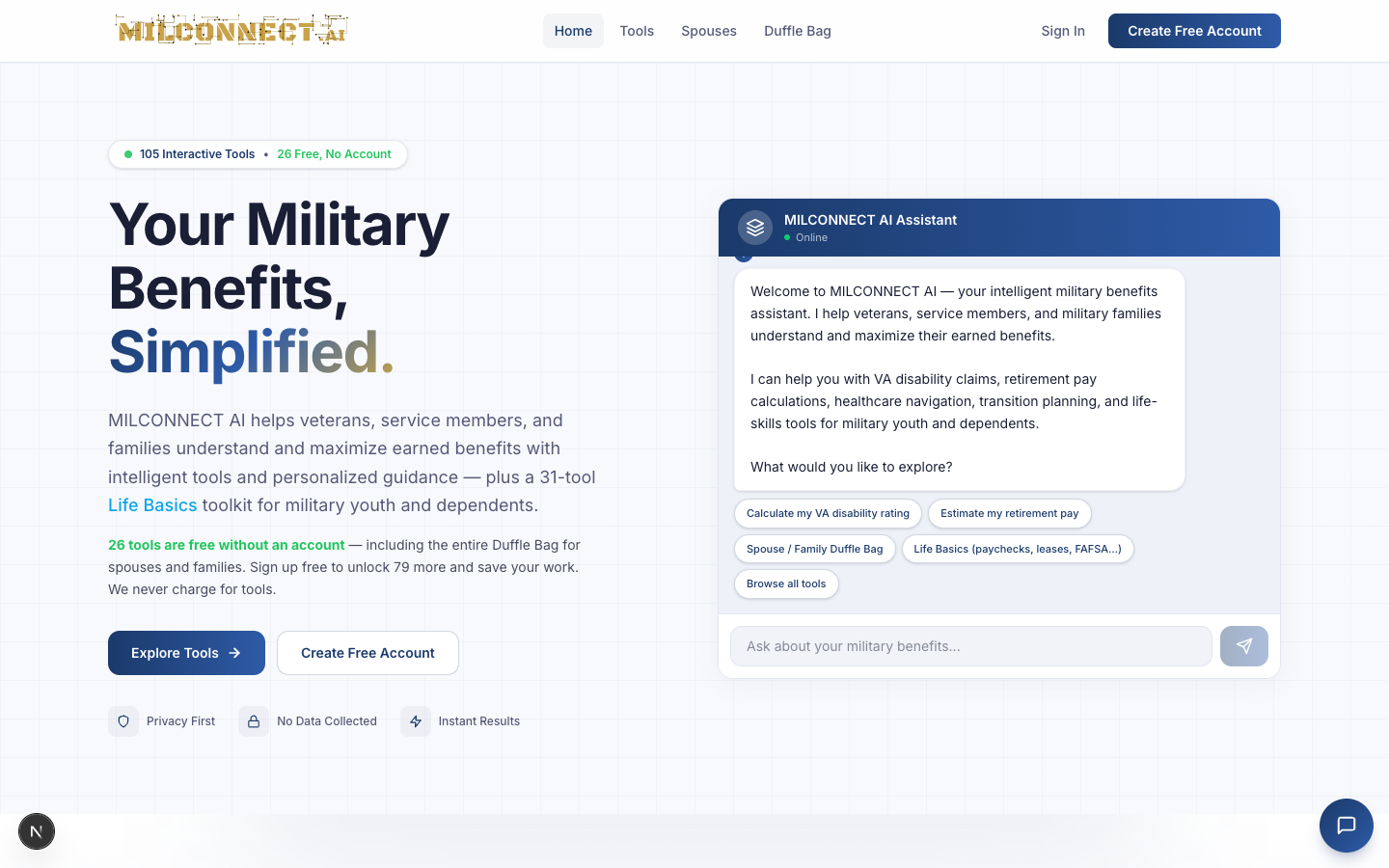
MILCONNECT.AI is the Military Benefits Intelligence Platform — 105 interactive tools that turn the alphabet soup of military and veterans benefits into clear numbers, dates, and next steps.
- 26 tools are free, no account required. Anyone can use them.
- The other 79 unlock with a free account. No payment, ever.
- Account holders also get the Record Keeper — a private, encrypted document vault for DD-214s, claim letters, and service records.
- The Duffle Bag is our 22-tool spouse & family toolkit (budgets, taxes, TRICARE, PCS, SCRA, career prep) — all free, no account required.
We are an information platform. We are not a law firm, a financial adviser, or a VSO. We do not file claims for you. We help you understand what you have, what you're owed, and what to ask next.
2. The five user personas
Signup asks for Status, which routes the entire experience — profile assessment, default category, recommended tools, even the copy on dashboard widgets.
| Persona | Status value | Their problem | Default category |
|---|---|---|---|
| Active Duty | Active Duty | Optimizing pay, BAH, TSP, PCS while still in uniform | While You Serve |
| Veteran | Veteran | Filing the right claims, finding the right state, translating skills | VA Disability & Claims |
| Retired | Retired | CRDP vs CRSC, SBP, tax optimization, second-career planning | Pay & Retirement |
| Reserve / Guard | Reserve/Guard | Point counting, drill pay, dual-status edge cases, gray-area retire | Pay & Retirement (Reserve) |
| Family — Spouse | Family Member → Spouse | Helping their servicemember; survivor planning; spouse careers | Spouses + full toolkit |
| Family — Youth | Family Member → Youth | First job, paycheck, FAFSA, first apartment, first contract | Life Basics |
The signup form hides rank/branch when status is Family Member because dependents don't have personal ranks.
3. The 30-second tour
When someone hits milconnect.ai:
- Hero explains the value prop and the 26 free tools.
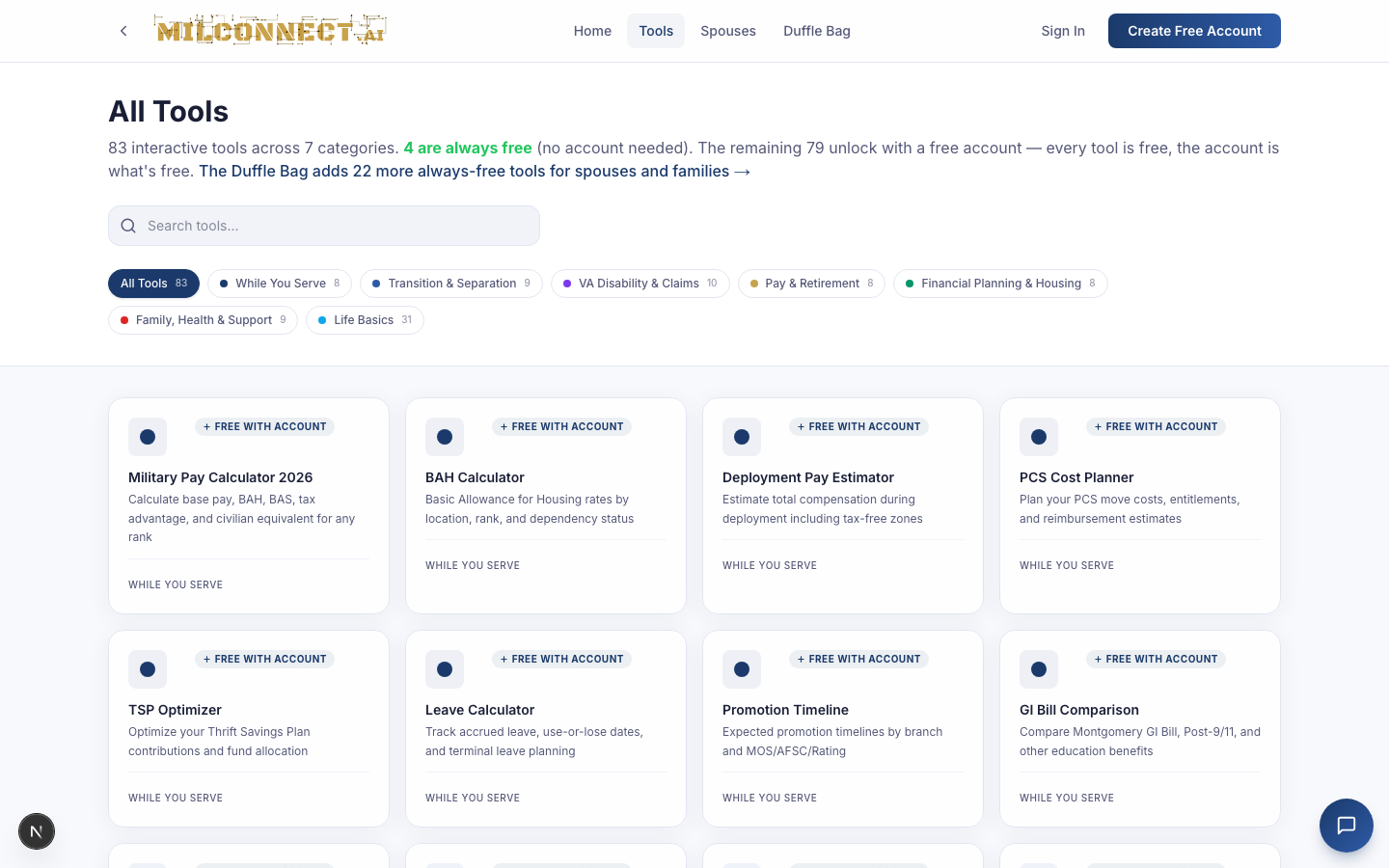
- Explore Tools → public tool index, organized by category.
- Create Free Account → step-by-step signup, no credit card.
- Tools menu → category dropdown.
- Spouses link → tailored landing page for spouses/dependents.
- Duffle Bag link → the 22-tool spouse & family toolkit (always free, no account).
- Record Keeper → encrypted document vault (locked until signup).
4. Free vs. account-only — what you get
Always free (26 tools, no account)
The flagship free tools live across four categories and are designed to deliver a complete answer in a single sitting:
- VA Disability Rating Calculator — combined rating with bilateral factor and 2026 comp rates.
- Retirement Pay Calculator — High-3, BRS, Final Pay, Reserve side-by-side.
- State Veterans Benefits Comparison — 50 states + DC + 5 territories.
- VSO & Representative Guide — rep types, major orgs, scam avoidance.
Plus 22 other free tools across the catalog. Free tools work without sign-in by design; we'd rather you get the answer than gate it.
Unlocked with a free account (79 more tools)
- All 31 Life Basics tools (paycheck decoder, FAFSA, first apartment, lease decoder, credit cards, side gig tax).
- DD-214 Analysis & Record Keeper — upload, parse, store.
- Federal Resume Builder, SkillBridge Finder, Transition Timeline.
- CRDP/CRSC Comparison, SBP Analyzer, TSP Optimizer, Blended Retirement.
- TRICARE Plan Navigator, Survivor Benefits, Caregiver Programs.
- The Record Keeper — encrypted document storage for DD-214s, claim letters, and service records.
Account holders can save tool results, sync across devices, and share access with a spouse via the invite flow.
5. Onboarding flow by persona
The signup form is /signup. It's three steps, 60–90 seconds.
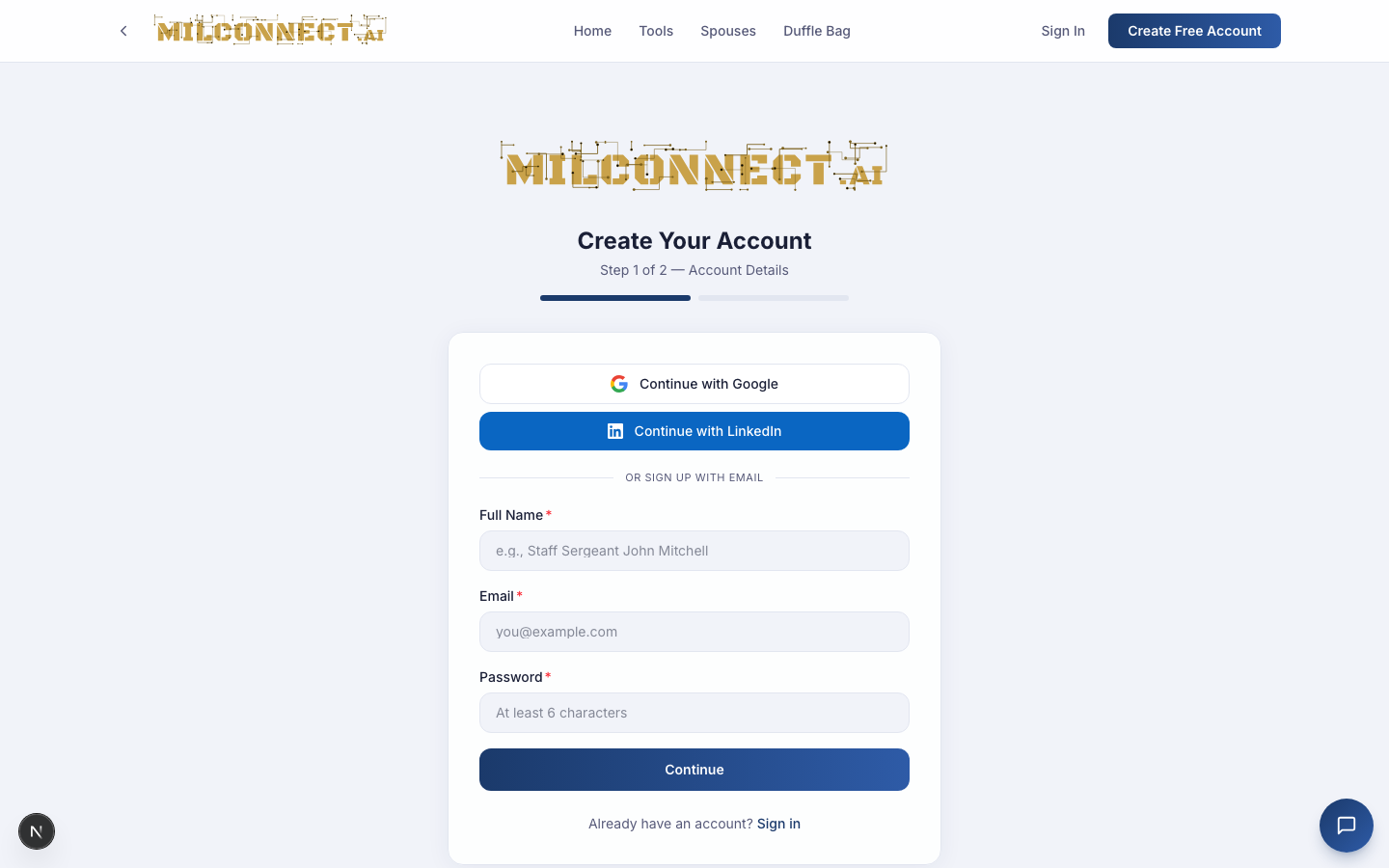
Step 1 — Identity
- Name, email, password
- Status — the routing decision (changeable in /profile)
Step 2 — Service context (varies by status)
- Active Duty / Reserve / Guard: branch + rank + unit + clearance.
- Veteran / Retired: branch + final rank + service era + DD-214 upload prompt.
- Family Member → Spouse: show "Invite your servicemember" card.
- Family Member → Youth: skip rank/branch, jump to Life Basics.
Step 3 — Assessment
A short questionnaire that picks the top 6 tools to surface on the dashboard. Branches by status — servicemembers see "what are you working on"; veterans see "where are you in the claim process"; spouses see "what does your servicemember need"; youth see "which life thing are you tackling first."
6. Tool walkthroughs
The four flagship free tools below are the best teaching examples because they don't require an account — open them in any browser and follow along.
6.1 VA Disability Rating Calculator
Free: yes • Time to first result: ~60 seconds
What it does
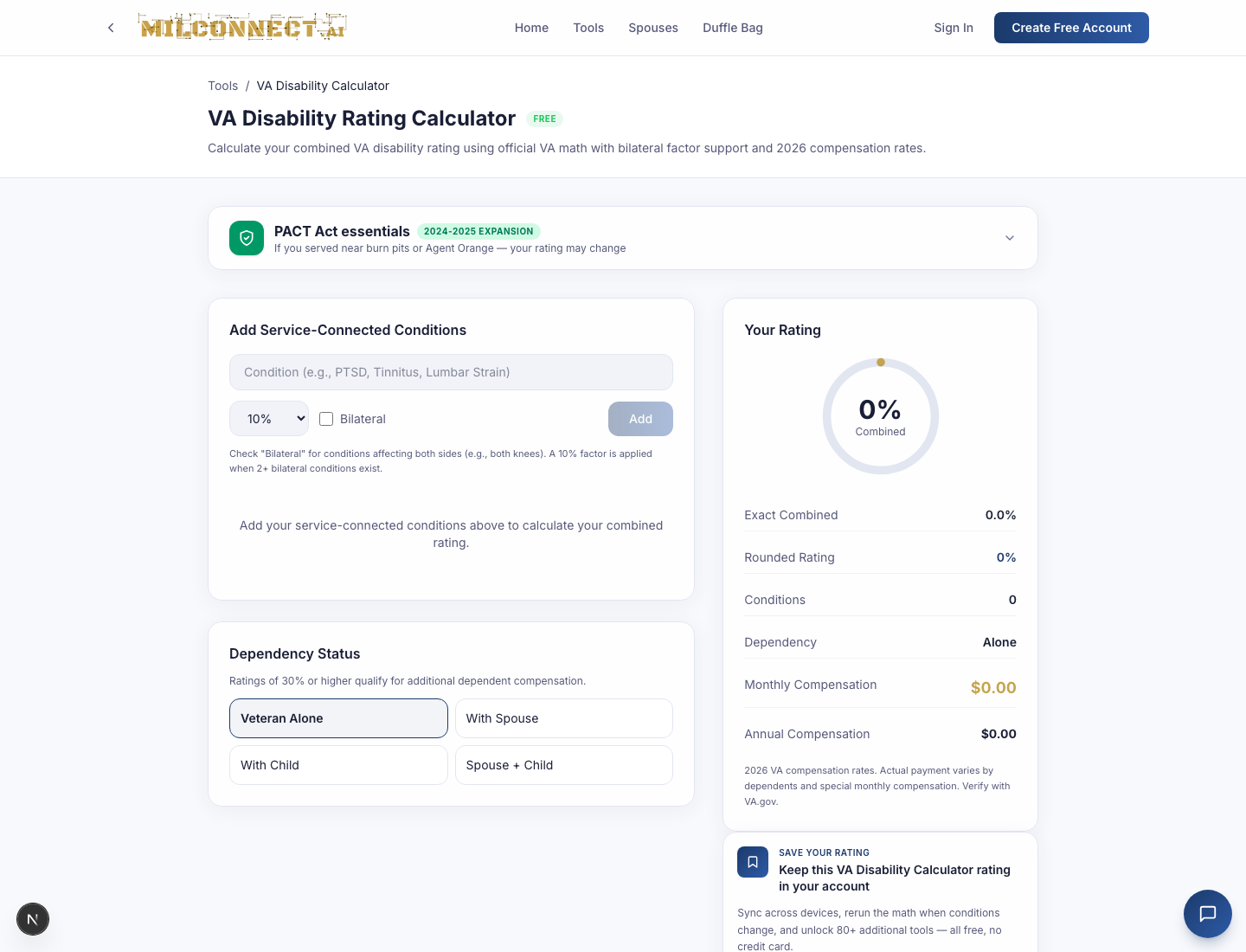
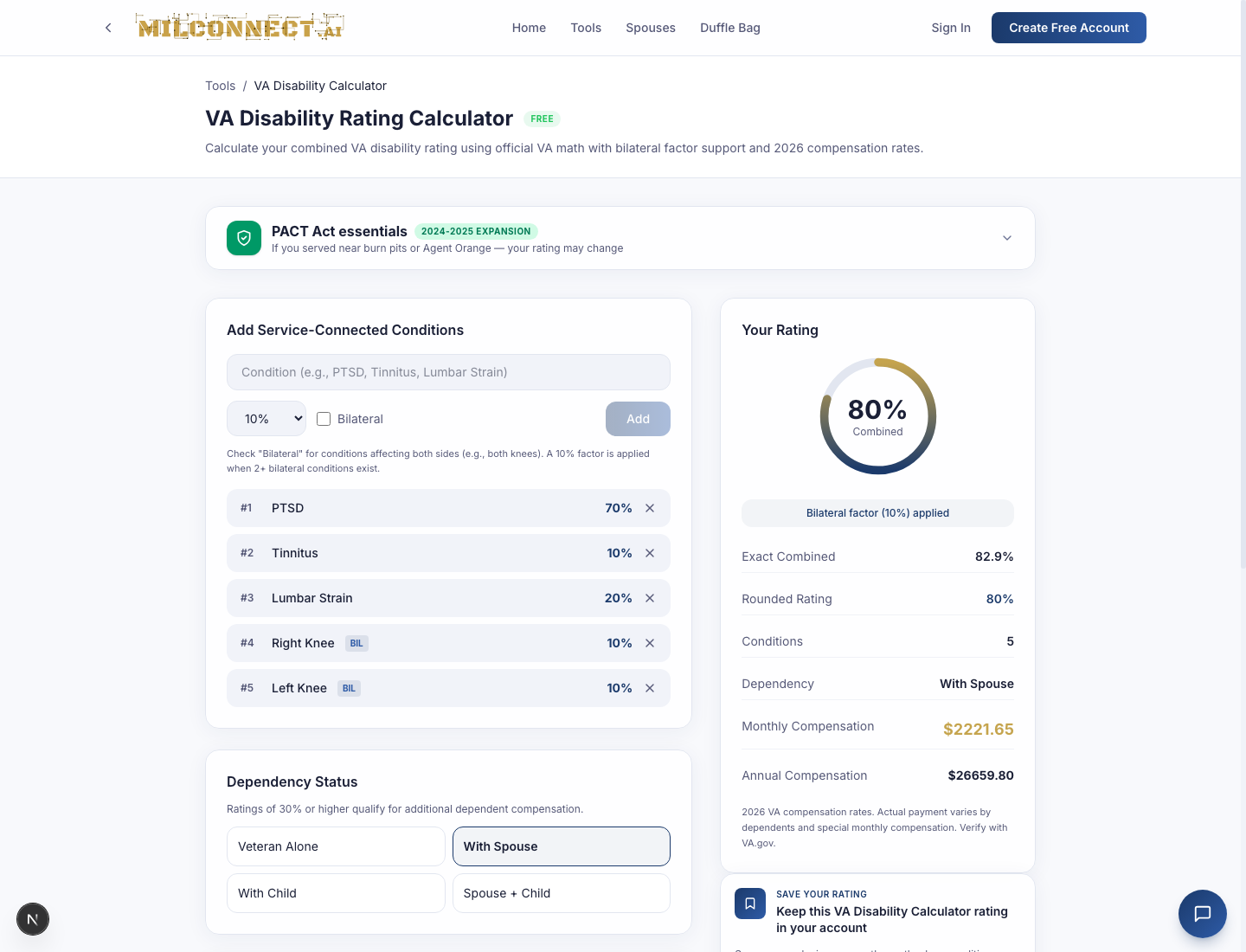
Computes a combined VA rating from individual conditions using the VA's actual math (not simple addition). Applies the bilateral factor (10% bonus) when two or more bilateral conditions are rated, then maps the rounded combined rating to the 2026 compensation table using dependency status.
How to teach it
- Add five conditions: PTSD 70%, Tinnitus 10%, Lumbar Strain 20%, Right Knee 10% bilateral, Left Knee 10% bilateral.
- Set dependency to With Spouse.
- Right rail updates live: exact 82.9% → rounded 80% → $2,221.65/mo (2026 rates).
Teaching points
- VA math is NOT additive. 70 + 20 ≠ 90.
- Bilateral factor only applies to paired-limb conditions (knees, hands, eyes).
- Rounding happens after combining, to the nearest 10.
- Dependent rates kick in at 30% or higher.
- The PACT Act callout flags burn-pit and Agent Orange presumptives.
6.2 Retirement Pay Calculator
Free: yes • Time to first result: ~45 seconds
What it does
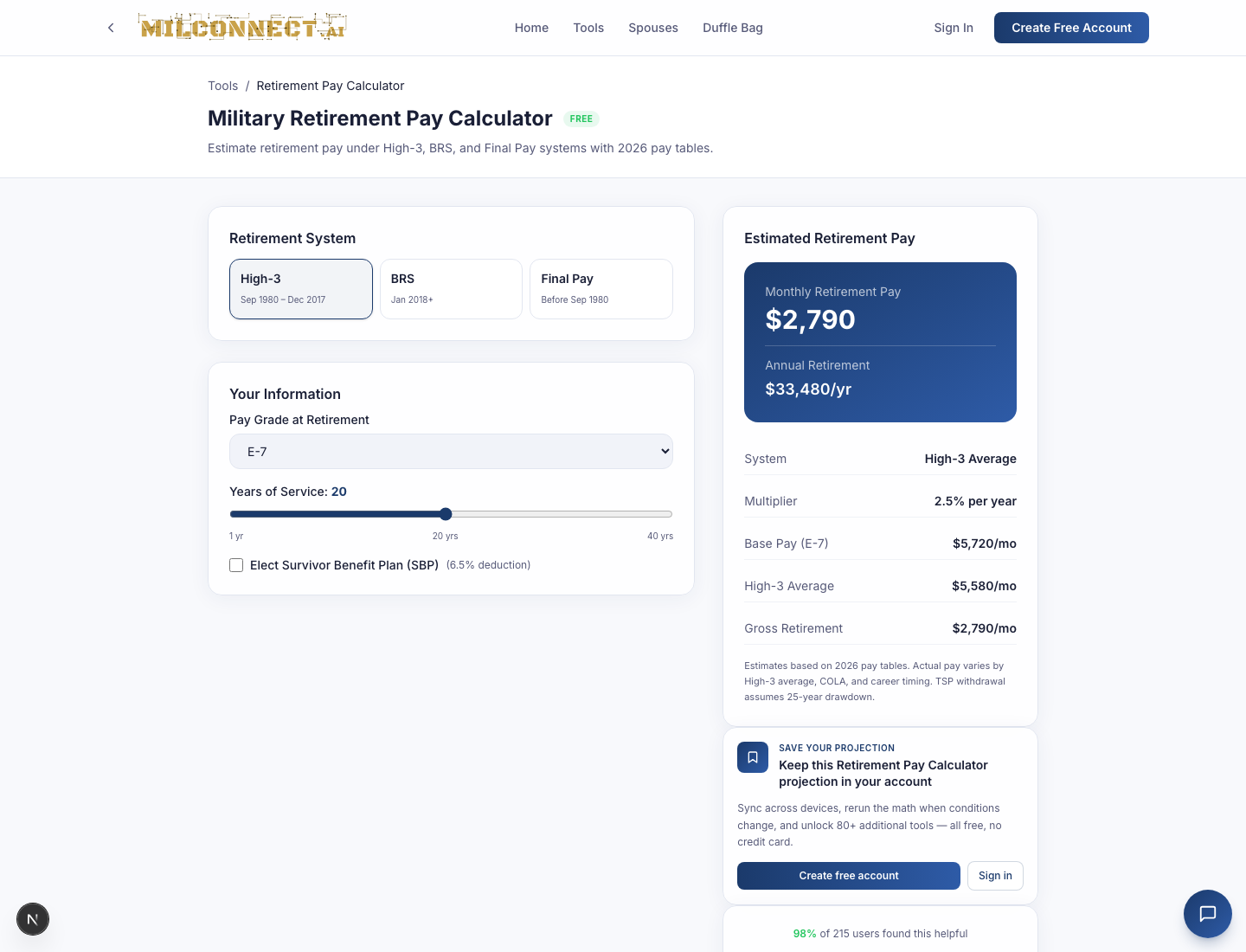
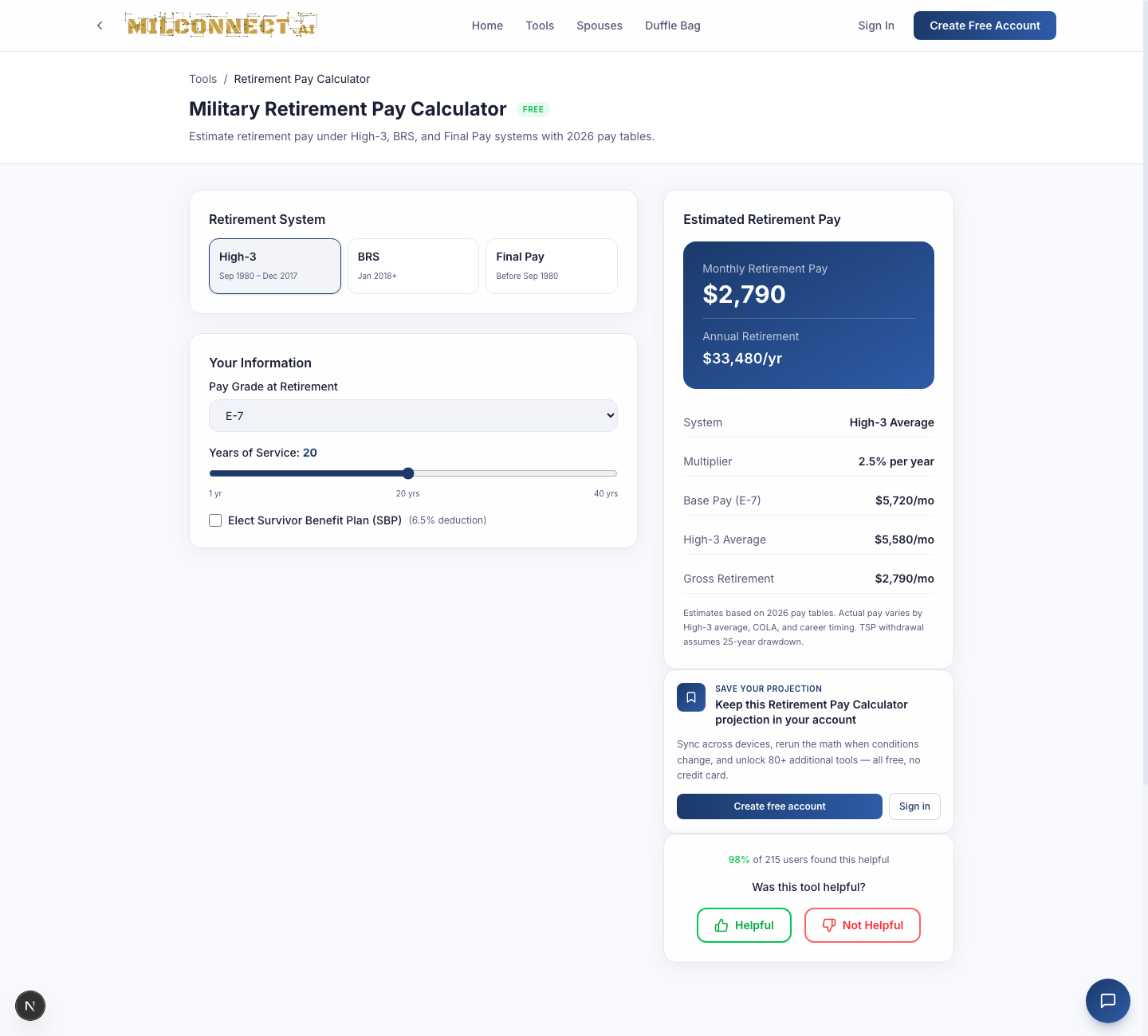
Compares retirement pay under High-3, BRS, and Final Pay using 2026 base-pay tables. For BRS, it folds in TSP balance projection and the continuation-pay bonus at 12 years.
How to teach it
- Pick High-3 (default) — most common for current retirees.
- Default inputs: E-7, 20 years of service, $250k TSP.
- Switch to BRS to show students how much retirement comes from TSP vs. the pension itself.
Teaching points
- High-3 = avg. highest 36 months × 2.5% per year.
- Final Pay (pre-Sept 1980 entry) = final base × 2.5% per year.
- BRS = High-3 × 2.0% per year + matched TSP + continuation pay.
- Estimates assume 2026 pay tables. Real pay depends on High-3 average, COLA, career timing.
6.3 State Veterans Benefits Comparison
Free: yes • Time to first result: ~30 seconds
What it does
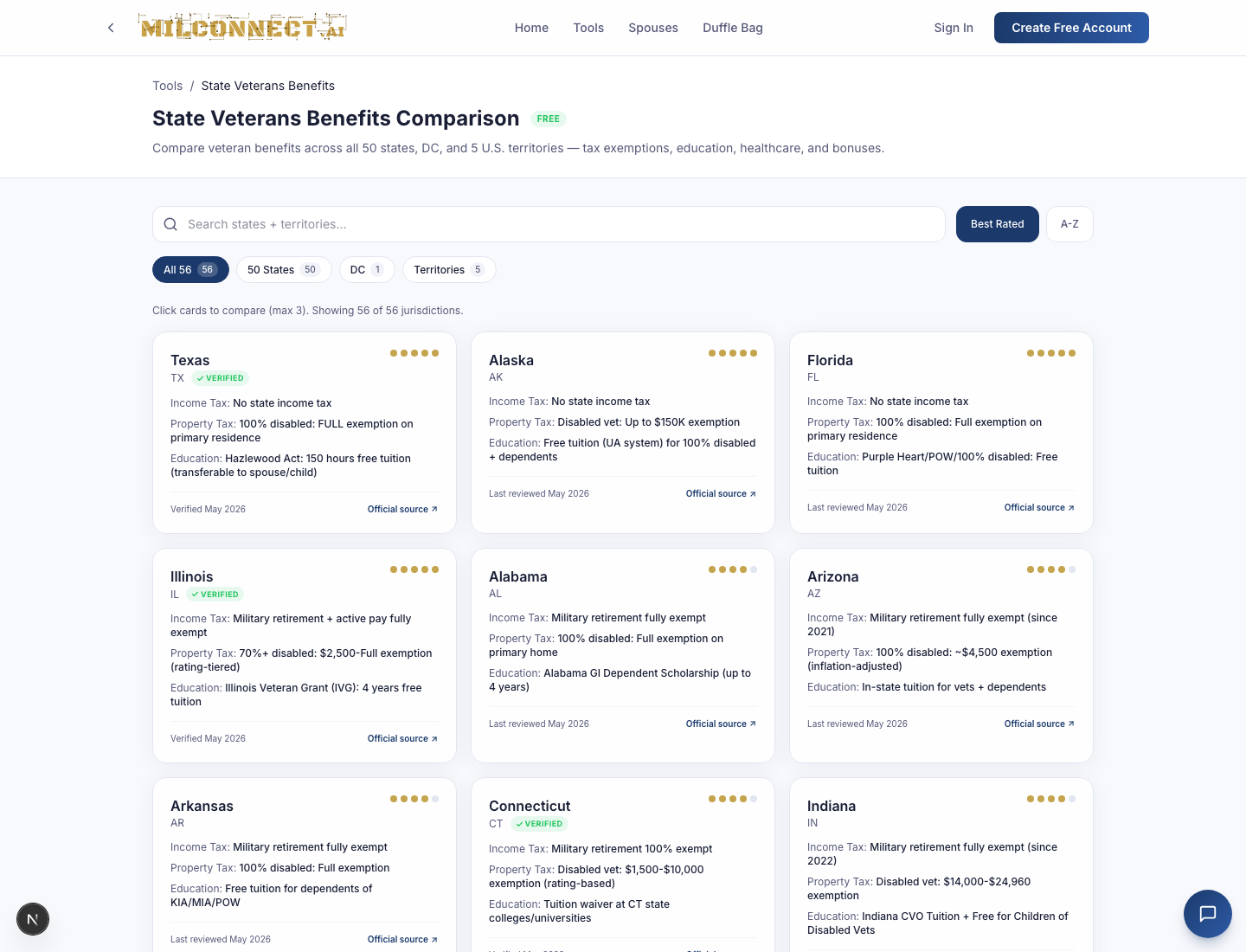
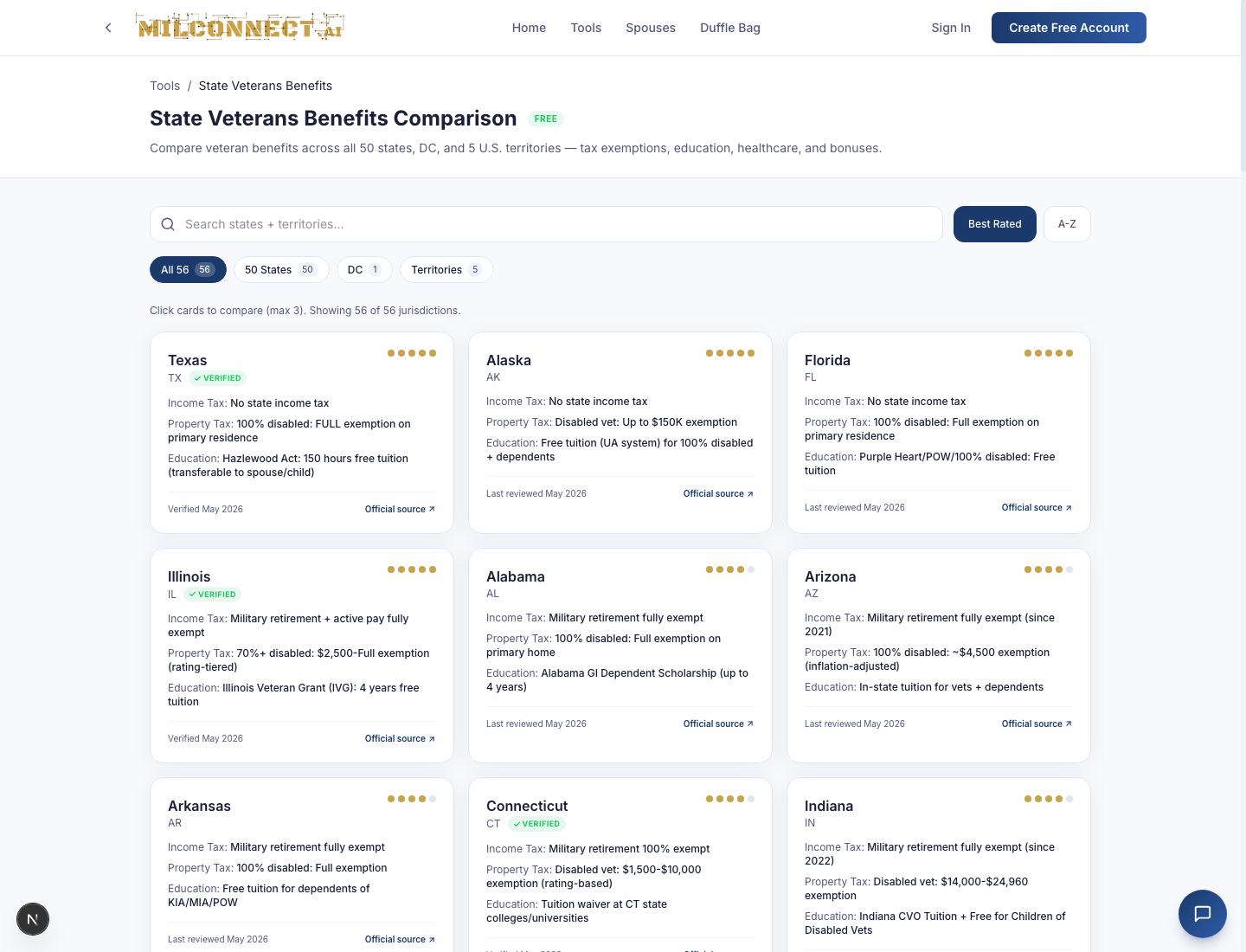
Maps all 50 states + DC + 5 U.S. territories on five axes: property-tax exemption, income tax on military retirement, education benefits, veteran bonuses, and healthcare. Every benefit links to the authoritative state source.
How to teach it
- Open the grid — default view shows all 50 + DC + territories.
- Click into a state (e.g., Texas) for property tax tiers, Hazlewood Act, disabled-vet plates.
Teaching points
- Property tax exemptions vary wildly (TX, FL, OK fully exempt 100% P&T; some cap at $5–10k).
- State income tax on mil retirement is exempt in all 50 + DC as of FY 2026.
- Territories have their own VA service structure (Caribbean Healthcare System for PR/VI).
- Tool is editorially independent — we're not paid to feature any state.
6.4 VSO & Representative Guide
Free: yes • Time to first result: ~2 minutes (read-heavy)
What it does
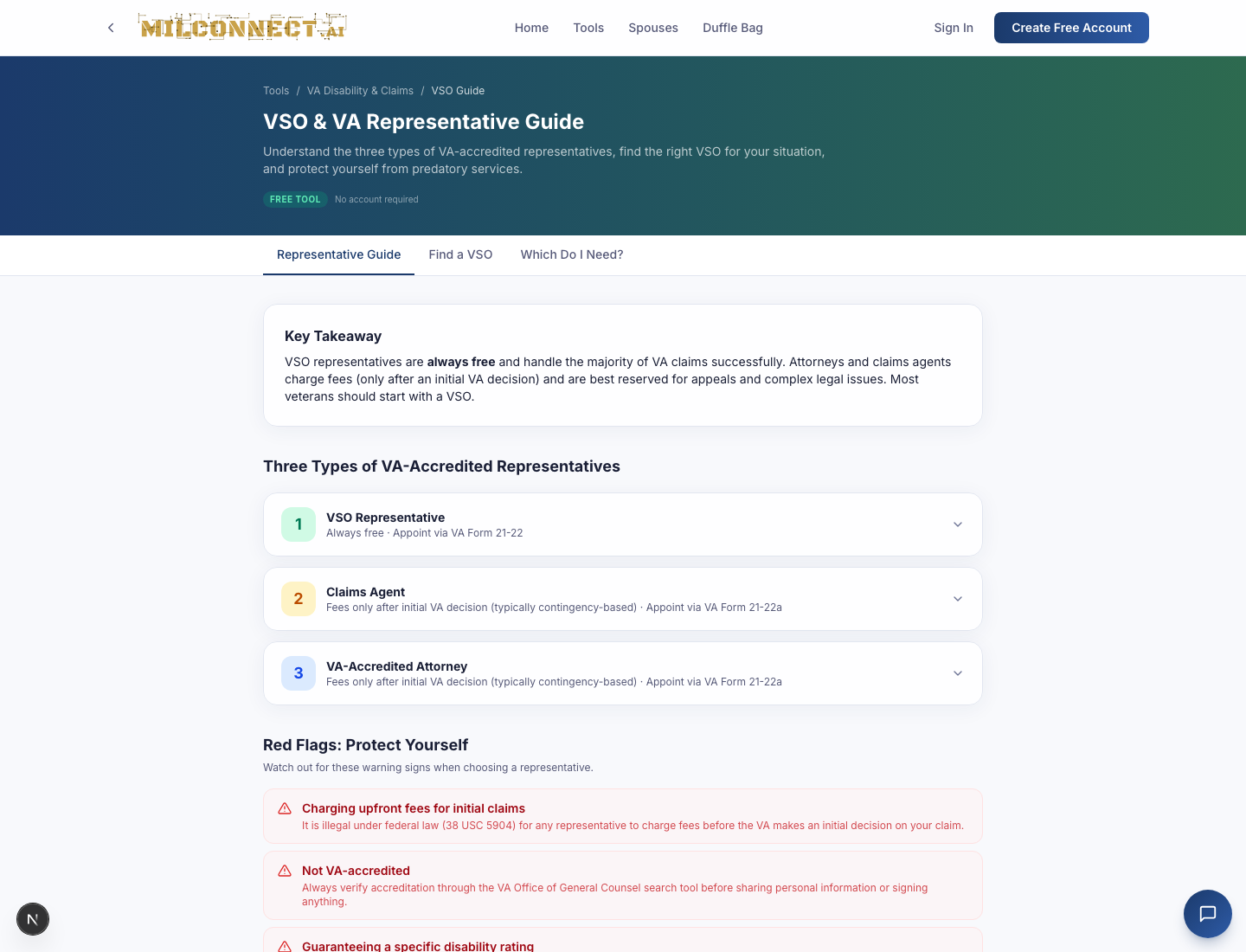
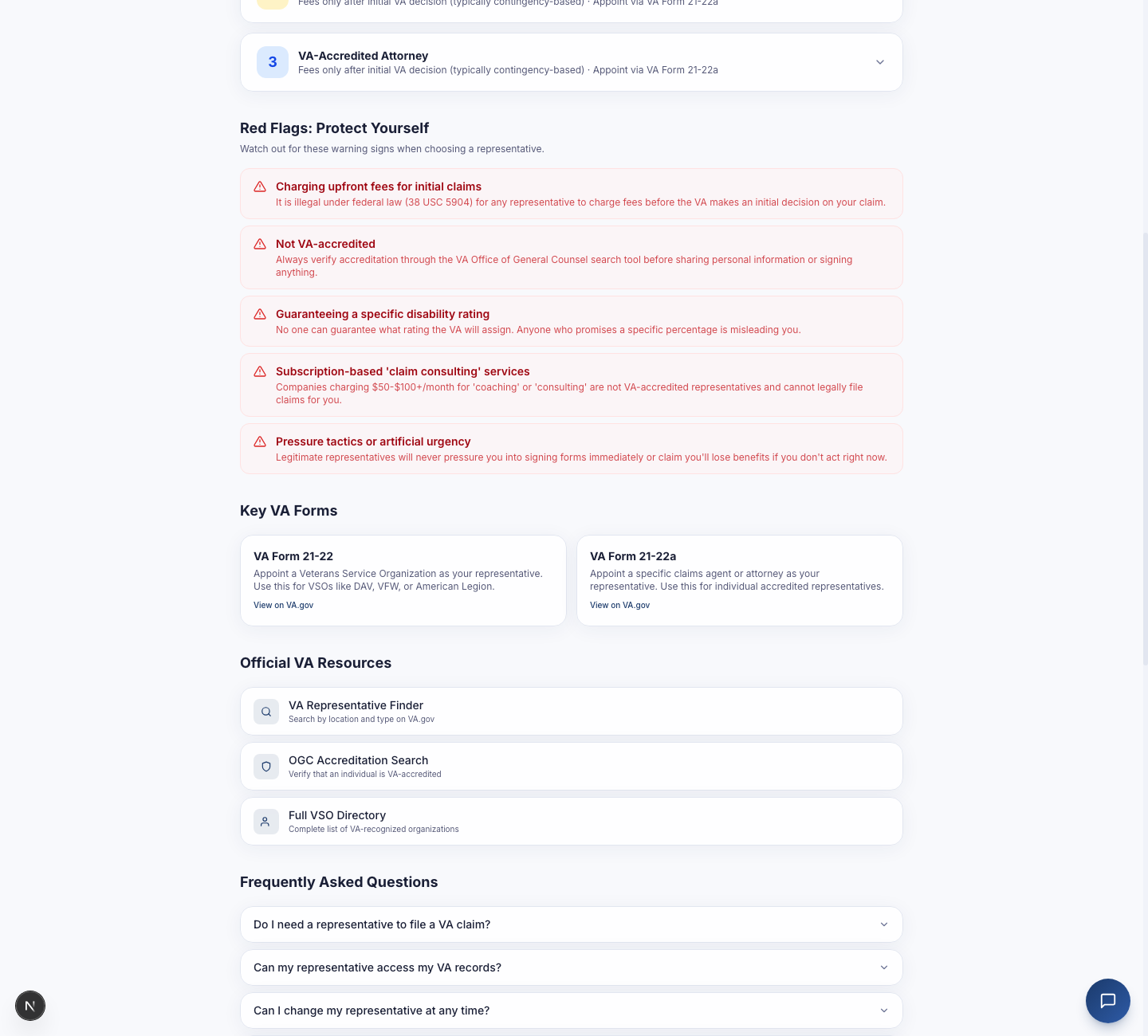
Explains the three classes of accredited representative (VSO rep, claims agent, accredited attorney), compares major VSOs (DAV, VFW, AmVets, American Legion), and walks through scam patterns — particularly 'claim sharks' charging a percentage of back pay.
How to teach it
- VSO-accredited reps are free — period.
- Attorneys can charge for appeals (post-denial), capped at 20% of past-due benefits by statute.
- Check VA accreditation at ogc.va.gov — we link out every time.
Teaching points
- Account holders can save a shortlist of VSOs they've contacted.
- Largest free coverage: DAV, VFW, AmVets, American Legion, MOPH.
- Major red flag: anyone asking for a fee on an initial claim.
7. Duffle Bag & Record Keeper
Two features users routinely confuse — they sound similar but do very different things. Here's the clean split.
The Duffle Bag — 22 free tools for spouses & families
The Duffle Bag is our spouse and family toolkit: 22 free tools, no account, no tracking. Budgets, taxes, TRICARE, PCS, SCRA protections, career prep — all running in the browser, designed for the spouse who needs an answer in the next ten minutes.
- Money & Budgets — paycheck decoder, BAH calculator, deployment savings planner.
- TRICARE — plan navigator, in-network search, prescription cost.
- PCS — orders checklist, weight allowance, dislocation allowance estimator.
- SCRA Protections — interest-rate cap calculator, lease termination eligibility.
- Career Prep — MyCAA finder, license-reciprocity by state, remote-job filters.
Public URL: /active-duty/spouses/duffle-bag. No login wall.
The Record Keeper — encrypted document vault (account only)
The Record Keeper is the account-only document vault. It opens with pre-built folders that mirror our tool categories so users don't stare at an empty file picker:
- DD-214 & Service Records
- VA Claims & Decisions
- Medical Records & C&P Exams
- Pay & Retirement Statements
- Family & Survivor Docs
- Life Basics — Money & Paychecks
- Life Basics — First Job & Career
- Life Basics — Housing & Lease
- Life Basics — Education & Loans
Documents are encrypted at rest and never indexed for search by us. Account holders can grant their spouse view-only access via the invite flow (/profile → "Invite your spouse").
We do not currently OCR or auto-fill from uploaded documents. That's on the roadmap. Today, the Record Keeper is for safekeeping and sharing, not parsing.
8. Working with a representative
Veterans can connect with a VA-accredited representative (VSO rep, claims agent, or attorney) directly on milconnect.ai, share documents from their Record Keeper, exchange secure messages, and generate a prefilled VA Form 21-22 for the formal appointment — all without leaving the platform.
The veteran is in control end-to-end: nothing is shared until the veteran explicitly shares it, every view and download is logged in an append-only audit trail, and the connection can be wound down at any time. There is no claim filing on milconnect.ai itself — we're the workspace; the rep still files via VA.gov or their VSO's own system.
8.1 Veteran's flow — connect with a rep in 4 steps
- Find or invite your rep. Open
/connectionsand choose Send invite. Enter the rep's email and an optional note. We email them a one-time link valid for 30 days. (If you don't have a rep yet, the VSO & Representative Guide tool walks through finding one.) - Share specific documents. From
/documentschoose Manage sharing on any uploaded file and toggle it into the shared folder for that connection. You can un-share at any moment; the rep loses access the instant you do. - Message securely. The Messages link on each connection card opens a private thread that lives entirely on milconnect.ai — no email forwarding, no third-party chat. Unread counts surface as a red badge on
/connections. - Generate VA Form 21-22 / 21-22a. Click VA Form 21-22 on the connection row to open a prefilled, printable view of the formal appointment form. Review, print, sign by hand, and submit via VA.gov per your rep's instructions. (The form is generated client-side; we don't store a copy.)
8.2 Representative's flow — sign up & manage clients
Reps have a dedicated signup at /signup/representative (not linked from the public homepage by design — reps usually arrive via an invite link or direct URL). The form asks for:
- Name, email, password
- Representative type — VSO rep, claims agent, or VA-accredited attorney
- Accreditation number & state — exactly as listed in the VA OGC tables
- Optional: organization name, .gov / .mil / recognized VSO email for ownership proof
Right after signup the rep lands on an Awaiting verification screen with their account already created. In the background we run two independent checks:
- OGC accreditation match — we look up the name + state + accreditation number against the VA Office of General Counsel registry. Match → green Verified badge surfaces next to the rep's name on every veteran-facing UI.
- Official-email ownership — if a .gov/.mil/VSO email was provided, we send a magic link to that inbox. Clicking it confirms the rep actually controls that mailbox.
Once both checks pass, the rep's status flips to active, they become discoverable in the veteran-side rep finder, and the verified badge appears on their cards. The rep's own dashboard lives at /clients (all clients) and /clients/insights (cross-client deadline buckets — C&P exams, evidence requests, appeals).
8.3 What stays private — and what gets logged
- Reps never see un-shared documents. A rep on your connection cannot enumerate or peek at files in your Record Keeper that you haven't explicitly toggled into the shared folder. The same isolation applies across reps' clients — one client's data is structurally invisible to a different client's rep view.
- Every view, share, unshare, upload, and download is logged. Open Activity on any connection (or
/connections/[id]/activity) to see the append-only audit feed. Entries cannot be edited or deleted — by design. - Reps can take private notes on each client that the veteran never sees. Notes are scoped to the rep who wrote them — they don't even surface to a different rep on the same client.
- Ending the connection is a two-step wind-down. Step 1 marks the connection pending revoke. Step 2 (type "END" to confirm) archives it: the rep loses active access immediately and keeps read-only access for 10 days so paperwork in flight can wrap up, then access is purged.
8.4 Notifications — bundled, not noisy
High-volume events (share, unshare, upload, new message) are batched into a single email every five minutes per recipient. State changes that genuinely need immediate attention (invite accepted, revoke requested, revoke confirmed) go out immediately. No matter what, you can always see the full history in the per-connection activity log.
8.5 Quick reference
| Where | What you do there |
|---|---|
| /connections | Send invites, see all your active reps/clients, open Messages / Activity / VA Form 21-22. |
| /clients | Rep-only. Full list of clients with shared-doc counts & last-activity stamps. |
| /clients/insights | Rep-only. Cross-client deadline buckets — C&P exams, evidence requests, appeals. |
| /signup/representative | Rep signup form. Requires VA OGC accreditation number. |
9. Test account & teaching environment
When teaching, do not use a real benefit record. Spin up a disposable account and seed it with anonymous data.
Recommended teaching setup
- Open /signup in a fresh browser profile or incognito window.
- Use a placeholder identity:
- Name:
Demo User - Email:
you+demo@gmail.com(the+trick routes to your real inbox) - Password: any strong password from your manager
- Name:
- Pick the status that matches the persona you're teaching.
- Skip optional fields — the tools all run on placeholder data.
- After teaching, delete the account in
/profile→ Account → Delete. Irreversible.
Why we don't ship a shared demo account
A shared "demo@" account would either (a) collect everyone's notes in one bucket — bad privacy — or (b) reset every session and discard your work mid-class. The 60-second signup gets you a clean slate that's actually yours.
The save-to-account nudge (teaching note)
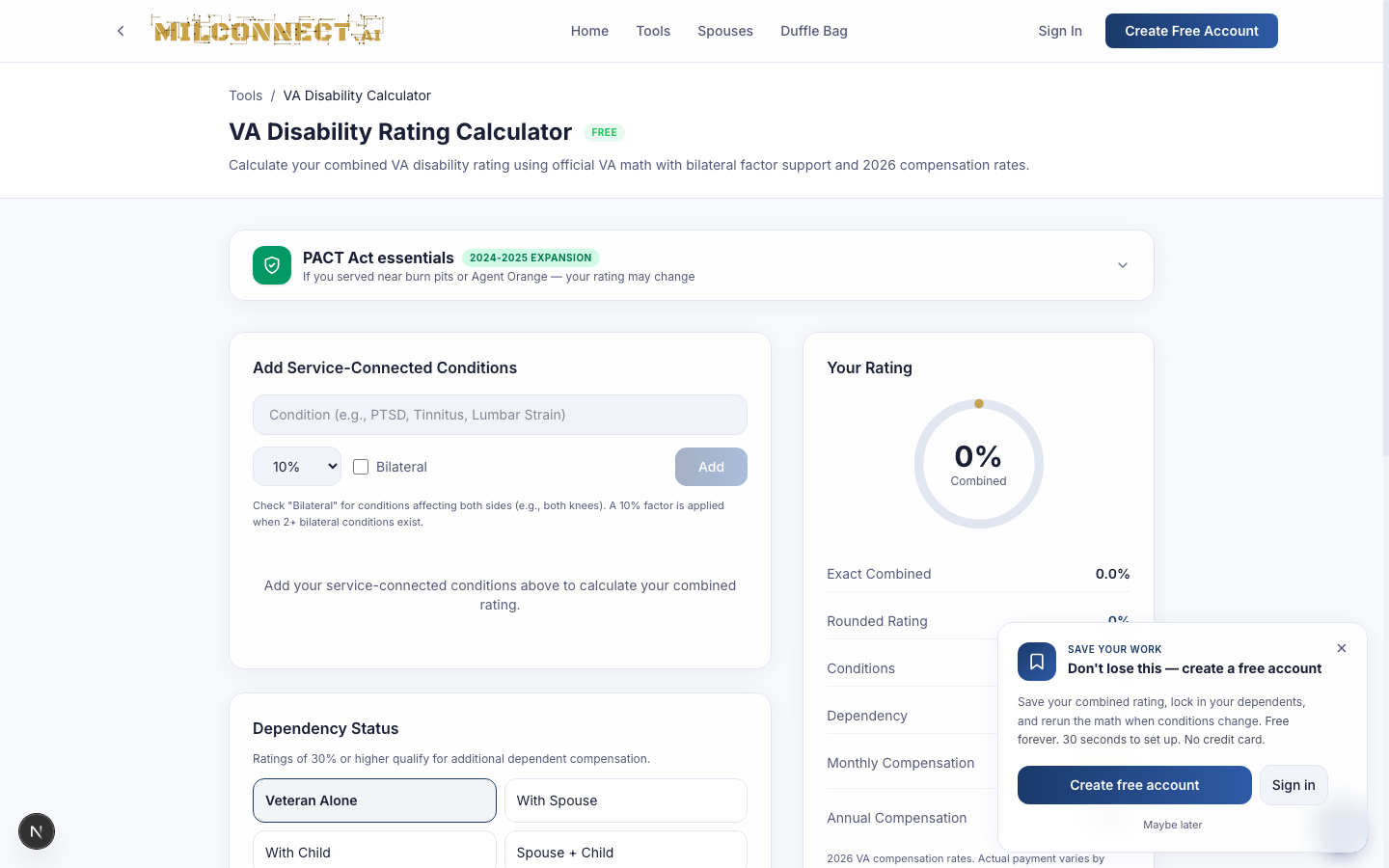
While teaching the free tools, you'll see a popup slide in after ~45 seconds or after scrolling past a result. That's the account-conversion nudge. Dismiss it during the demo with Maybe later or by clicking the X — it'll stay hidden for 7 days in that browser.
10. Common questions & troubleshooting
I added conditions but my rating shows 0%.
The widget only updates after you press Add. Pressing Enter on the keyboard also works.
The bilateral checkbox didn't do anything.
Bilateral only fires when at least two conditions are bilateral. A single bilateral knee doesn't trigger the 10% factor.
My state isn't in the comparison.
We cover all 50 + DC + 5 U.S. territories. If you don't see one, it's likely a state-name vs. abbreviation issue — try the full name.
Why am I being asked to sign in mid-tool?
You aren't — the four flagship tools are fully free. The save-your-result CTA is dismissible. Closing it doesn't lose your work.
How do I delete my account?
Profile → Account → Delete account. We purge user records and sessions immediately; backups roll out within 30 days per our privacy policy.
How current are the compensation tables?
2026 rates throughout. We refresh on the COLA effective date each December. Every comp number has the source year visible on the page.
How do I find an accredited representative on milconnect.ai?
Open /connections and use the rep search, or read the VSO & Representative Guide tool first to learn the three rep types and what to look for. We only list reps whose VA OGC accreditation we've verified — they get a green Verified badge.
Can my representative see everything in my Record Keeper?
No. A rep on your connection can only see documents you have explicitly toggled into that connection's shared folder, plus any docs they uploaded into it themselves. Un-toggling a document removes their access immediately. Every view and download is logged in the connection's activity feed.
What happens if I end the collaboration with my rep?
Ending is a two-step wind-down: step 1 marks the connection 'pending revoke', step 2 (you type END to confirm) archives it. The rep loses active access immediately and keeps read-only access for 10 days — long enough to wrap up paperwork in flight — then all access is purged.
11. Glossary
| Term | Meaning |
|---|---|
| BAH | Basic Allowance for Housing |
| BAS | Basic Allowance for Subsistence |
| BRS | Blended Retirement System (post-2018 entrants by default) |
| CRDP | Concurrent Retirement and Disability Pay |
| CRSC | Combat-Related Special Compensation |
| C&P | Compensation & Pension (the VA exam type) |
| DD-214 | Certificate of Release or Discharge from Active Duty |
| DIC | Dependency and Indemnity Compensation (survivor benefit) |
| High-3 | Avg. of highest 36 months base pay, used to compute retired pay |
| MEB/PEB | Medical / Physical Evaluation Board |
| P&T | Permanent and Total (disability rating, opens special benefits) |
| PACT Act | 2022 law expanding presumptives for burn-pit / Agent Orange |
| PCS | Permanent Change of Station |
| SBP | Survivor Benefit Plan |
| SGLI/VGLI | Servicemembers' / Veterans' Group Life Insurance |
| TSP | Thrift Savings Plan |
| VSO | Veterans Service Organization |
| VR&E | Vocational Rehabilitation & Employment (Chapter 31) |
| OGC | VA Office of General Counsel — the authority that accredits reps; we cross-check signups against their public registry |
| Accreditation Number | Unique ID the VA assigns to each accredited rep; required at /signup/representative |
| Audit Log | Per-connection, append-only history of every share / view / download. Never editable, never deletable |
| VA Form 21-22 / 21-22a | Official form appointing a rep as your claimant's representative. 21-22 = VSO; 21-22a = individual (attorney/claim agent) |
docs/user-guide/USER_GUIDE.md. Re-render screenshots from the same folder when tool UIs change.